It's the end of term already?! I know, it's hard to believe, but here we are, almost in the exam period. Our exam isn't for a month, but that just means lots of extra time to study and make sure you really understand what's going on in class. Let's take a look back over the course: a trip down memory cell lane...
Looking back over the course, the major hurdle we had to overcome was of course the strike. Having to teach ourselves or find alternate workshops for the most difficult of the course content was not an easy task. Specifically speaking, probably one of the most difficult concepts to overcome in this course was LinkedLists. Now, LinkedLists make sense to me, but for a while there I had to draw it out every time I came across an issue. Now, I can see it in my mind's eye with very little difficulty.
As for what this course has done for me, I think it has really improved my ability to think logically and find the easiest solution to a problem. When coding, I used to crudely try and trial-and-error my way around a problem, and attempt to clean up my code afterwards. Now, I look at a problem, and think about it for a while -- usually, I come up with a clean, quick, elegant solution with fairly little effort! This course has really helped me improve my overall computer science know-how, and has made me feel a lot more confident in Python as well as other computer languages.
We still have one last hurdle to overcome -- the exam. As it's still pretty far off, I haven't started studying yet, but I look forward to reviewing the concepts we learned this term and solidifying my computer science knowledge. Writing this slog has truly been a very helpful and enlightening experience as well. It's been a pleasure writing for you -- let's hope I see you on the flip side!
Tuesday, 31 March 2015

Friday, 27 March 2015
Looking Back at Recursion -- Not so Scary Now (Sometimes)
This week, we were asked to look back at an earlier blog post of ours and see if we still agree with ourselves. I've decided to look back at my post about Recursion, and maybe also my post about Object Oriented Programming, if I have space to write about two.
One of my biggest issues back in February with recursion was the tracing we were asked to as part of our assignments. Tracing is still a big issue for me as, while I think it is useful in the learning process, it is not necessarily a good idea to consistently trace recursion for simple exercises, or especially for big ones. With assignment two, we had a lot of recursion in our program, and as we were all using different homemade classes, it would have been very difficult to trace exactly. Of course, you need a general idea of what is going on in your program in order to write it, but you don't necessarily need to write everything out all the time. All in all, I agree with my earlier statement: "Tracing forces me to slow down my thinking and actually see how my program works, step by step.... [I] often get lost in my own thinking and add far too many mini steps between each step." I still get a little lost in my thinking when tracing, as I'm not sure if what I think is showing enough steps actually is showing enough steps.
However, I still understand that tracing is important, as I said in my earlier article -- "especially when it comes to the dreaded R-word: Recursion." (Also, I still think my 'in order to understand recursion, one must first understand recursion' x n joke is quite amusing.) I'm still not sure I would be able to understand recursion to a stranger, but I certainly have a better understanding of it now. I still agree that in order to understand recursion you just have to not think about it too much, but I feel more at ease with the whole concept than I did when originally writing this article.
In my previous post, I wrote "I think to truly become more comfortable with tracing recursion, I will need to fully understand what recursion means." I think I've reached this point, and while tracing may still be a pain, I think I could do it with relative ease when it comes down to it. Especially, let's be honest, when grades are at stake!
I hope the rest of my classmates are feeling better about their knowledge of recursion, and I look forward to discussing new ideas with them in the upcoming classes and labs!
One of my biggest issues back in February with recursion was the tracing we were asked to as part of our assignments. Tracing is still a big issue for me as, while I think it is useful in the learning process, it is not necessarily a good idea to consistently trace recursion for simple exercises, or especially for big ones. With assignment two, we had a lot of recursion in our program, and as we were all using different homemade classes, it would have been very difficult to trace exactly. Of course, you need a general idea of what is going on in your program in order to write it, but you don't necessarily need to write everything out all the time. All in all, I agree with my earlier statement: "Tracing forces me to slow down my thinking and actually see how my program works, step by step.... [I] often get lost in my own thinking and add far too many mini steps between each step." I still get a little lost in my thinking when tracing, as I'm not sure if what I think is showing enough steps actually is showing enough steps.
However, I still understand that tracing is important, as I said in my earlier article -- "especially when it comes to the dreaded R-word: Recursion." (Also, I still think my 'in order to understand recursion, one must first understand recursion' x n joke is quite amusing.) I'm still not sure I would be able to understand recursion to a stranger, but I certainly have a better understanding of it now. I still agree that in order to understand recursion you just have to not think about it too much, but I feel more at ease with the whole concept than I did when originally writing this article.
In my previous post, I wrote "I think to truly become more comfortable with tracing recursion, I will need to fully understand what recursion means." I think I've reached this point, and while tracing may still be a pain, I think I could do it with relative ease when it comes down to it. Especially, let's be honest, when grades are at stake!
I hope the rest of my classmates are feeling better about their knowledge of recursion, and I look forward to discussing new ideas with them in the upcoming classes and labs!
Unit Testing - Why should you do it?
Unit testing -- it's a lot of work. There's no doubt about it, it can be a long time before unit testing seems like it is worth it. I know for a good long while I thought unit testing was for the birds, but I think this week's lecture may have changed my mind.
Let's see -- what is useful about unit testing, especially when it comes to Python? Unit testing is very useful for having a good developed program, and especially when working in teams. Unit testing allows you to make small changes to your code and check that it still works, which can be very useful when dealing with large codes or multiple programmers. This can save a lot of time and headache, which can be very useful long-run.
Unit tests also really help you understand exactly what your program is all about. Yes, yes, I know -- you wrote it. Who knows it better than you yourself? But you can't claim to know all the inner workings of every Python class you call forth, or what exactly your code is doing every moment of its run. Unit tests make sure you have a better idea of the general idea of your program, and help you keep track of everything that could possibly need fixing. Unit tests give you a lot of immediate feedback, and really help define your code.
Unit testing helps keep your code concise and of quality. It's something you may not want to do, but it is a good habit to get into and will help you a lot if you manage to keep it up!
Let's see -- what is useful about unit testing, especially when it comes to Python? Unit testing is very useful for having a good developed program, and especially when working in teams. Unit testing allows you to make small changes to your code and check that it still works, which can be very useful when dealing with large codes or multiple programmers. This can save a lot of time and headache, which can be very useful long-run.
Unit tests also really help you understand exactly what your program is all about. Yes, yes, I know -- you wrote it. Who knows it better than you yourself? But you can't claim to know all the inner workings of every Python class you call forth, or what exactly your code is doing every moment of its run. Unit tests make sure you have a better idea of the general idea of your program, and help you keep track of everything that could possibly need fixing. Unit tests give you a lot of immediate feedback, and really help define your code.
Unit testing helps keep your code concise and of quality. It's something you may not want to do, but it is a good habit to get into and will help you a lot if you manage to keep it up!
Thursday, 19 March 2015
The Second Test - Impressions of Week 9
Despite the strike, we continued on with our second test on the semester, which focused mostly on Trees and Binary Trees. All in all, I didn't find the test too challenging -- as long as you keep up with class work and don't fall behind, you should be good! LinkedLists threw me for a bit of a loop, but as I said last week - draw, draw, draw!
As for the other activities of the week, we focused on a short lab on Binary Search Trees, or BSTs. When initially reading the question, I thought it was a lot more difficult than it was -- I thought they wanted us to include an insert method with property, but it turns out there was already an insert method like that in the starter code.
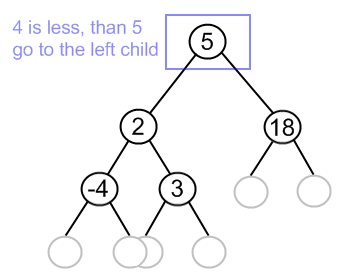
Binary Search Trees and property -- this is the one thing I forgot on the test, which I kicked myself for later. Property refers to the idea that all the lesser data goes to the left of the node, and the greater data goes to the right. The picture below demonstrates this.
As for the other activities of the week, we focused on a short lab on Binary Search Trees, or BSTs. When initially reading the question, I thought it was a lot more difficult than it was -- I thought they wanted us to include an insert method with property, but it turns out there was already an insert method like that in the starter code.
Binary Search Trees and property -- this is the one thing I forgot on the test, which I kicked myself for later. Property refers to the idea that all the lesser data goes to the left of the node, and the greater data goes to the right. The picture below demonstrates this.
All in all, not too much new news for week 9 -- whenever you have a test, that tends to take up most of your focus. I am looking forward to starting assignment 3 though!
Sunday, 15 March 2015
How to Draw Your Code
One of the main themes from week 8 was drawing pictures... But only to understand linked lists, of course! CSC 148 is branching (and I'm not only talking about Trees here) away from the easy data structures, and getting into some of the more complex ones. Linked lists can give you a bit of a headache, but once you understand how everything is connected, they are not too bad.
Linked lists are, as the name would suggest, a new form of list. They represent a sequence of a collection of nodes, all connected to one another. It's a bit abstract to explain, but they make a lot of sense when you draw out the connections.
A lot of our lab excercises this week covered inserting new nodes into previously created lists. I'm stealing a picture from Wikipedia to help explain myself, as you can see below.

All you have to do is create a new node, and relabel the values of the node before the place you want to put the new node and the one that' coming up next. Each node keeps track of what the next node is, but when you write your code you have to create a new variable to keep track of what the old node was, in order to properly organize your data structure. It makes a lot of sense, and helps keep your data structure neat and organized.
Linked lists are good for memory, and they keep the program run time down. Stacks and queues are especially useful for linked lists. However, linked lists do have their downfalls -- they don't have a lot of built in functions for indexing, meaning you might have to write your own helper functions. Traversing a linked list is not as easy as traversing a tree. Most crucially, it is really easy to get confused by linked lists -- if you don't keep careful track of what's doing what, you might find your code completely misses the point, as do the nodes in your linked lists! All in all, linked lists are one of the many data structures available in Python, though maybe not always the most convenient.
Linked lists are, as the name would suggest, a new form of list. They represent a sequence of a collection of nodes, all connected to one another. It's a bit abstract to explain, but they make a lot of sense when you draw out the connections.
A lot of our lab excercises this week covered inserting new nodes into previously created lists. I'm stealing a picture from Wikipedia to help explain myself, as you can see below.
All you have to do is create a new node, and relabel the values of the node before the place you want to put the new node and the one that' coming up next. Each node keeps track of what the next node is, but when you write your code you have to create a new variable to keep track of what the old node was, in order to properly organize your data structure. It makes a lot of sense, and helps keep your data structure neat and organized.
Linked lists are good for memory, and they keep the program run time down. Stacks and queues are especially useful for linked lists. However, linked lists do have their downfalls -- they don't have a lot of built in functions for indexing, meaning you might have to write your own helper functions. Traversing a linked list is not as easy as traversing a tree. Most crucially, it is really easy to get confused by linked lists -- if you don't keep careful track of what's doing what, you might find your code completely misses the point, as do the nodes in your linked lists! All in all, linked lists are one of the many data structures available in Python, though maybe not always the most convenient.
Tuesday, 3 March 2015
The Seven Week Itch
Ah, the week back from reading week -- so full of hope, anticipation, positivity. Until you realize that all the work you thought you caught up on was for naught -- there is a never-ending torrent of work to be done, especially in your computer science class.
Week 7 was devoted to finishing up the second assignment, which was not as easy as the first one. Assignment 2 is all about designing a game called Tippy, in which you play a game similar to tic-tac-toe, but instead of trying to get three in a row you try to place a tetromino somewhere on the board. Sounds easy, right? Maybe to play, and even maybe to code, but it's when you get down to the strategy that things get difficult.
In the first assignment, all we had to do was come up with a random strategy. In assignment two, we have to deal with a strategy called Minimax -- it can never lose, apparently! How are we supposed to write a program that can never lose, if we ourselves are always capable of losing? It was actually surprisingly simply, once you figured out everything that had to be done and applied the Tree methods we've been learning to your Minimax code. I won't post the details here, as the assignment hasn't been handed in yet, but needless to say I think I've learned a lot from writing the Minimax code.
Otherwise, week 7 sees things going as smoothly as ever in this computer science class -- classes are informative, labs teach me something new every time, and I'm genuinely enjoying the work that I'm doing. Binary trees are a good thing to learn, and I'm glad to have added them to my list of Python comprehension!
Week 7 was devoted to finishing up the second assignment, which was not as easy as the first one. Assignment 2 is all about designing a game called Tippy, in which you play a game similar to tic-tac-toe, but instead of trying to get three in a row you try to place a tetromino somewhere on the board. Sounds easy, right? Maybe to play, and even maybe to code, but it's when you get down to the strategy that things get difficult.
In the first assignment, all we had to do was come up with a random strategy. In assignment two, we have to deal with a strategy called Minimax -- it can never lose, apparently! How are we supposed to write a program that can never lose, if we ourselves are always capable of losing? It was actually surprisingly simply, once you figured out everything that had to be done and applied the Tree methods we've been learning to your Minimax code. I won't post the details here, as the assignment hasn't been handed in yet, but needless to say I think I've learned a lot from writing the Minimax code.
Otherwise, week 7 sees things going as smoothly as ever in this computer science class -- classes are informative, labs teach me something new every time, and I'm genuinely enjoying the work that I'm doing. Binary trees are a good thing to learn, and I'm glad to have added them to my list of Python comprehension!
Thursday, 26 February 2015
To Tree or Not to Tree
(Please mark my previous summary on Object Oriented Programming, found here)
Think you understand recursion? Just wait until you hit trees. Trees are a great way of structuring data -- they link several little trees, or nodes, together. Trees are just like trees in nature -- they start at the root, and then they branch off into different sections, ending with leaves. Each one of these branches is a child of the previous root, but a root with no children is called a leaf.
Trees are a little difficult to visual, especially as Python represents them as several nested nodes, all Trees -- it can get quite confusion. However, you can write a string representation method that helps you visual a Tree better. If not, do what I do -- I draw the tree I'm working with out, if it's not too long, and it helps me visual it and completely understand what I'm doing.
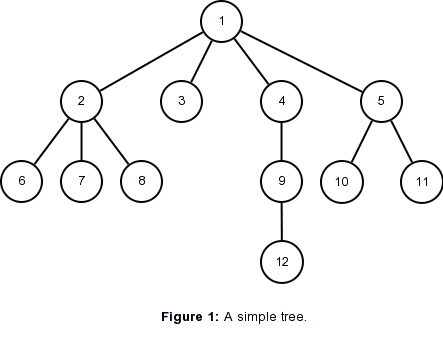
That's a diagram of a simple tree, but most trees end up looking something like that. The node "1" has children: 2, 3, 4, and 5. All but "3" have children of their own, and "4" even has some grandchildren. Visualizing a tree like this can really help with your understanding of your code -- especially when we get down to recursion.
Trees are made of recursion -- each tree contains several little trees within it, going around and around, just like recursion. It's a little difficult to wrap your head around it, but the trick is to not think about it too much! In the diagram above, not only is there a Tree that has a root of "1" but there is also a Tree that has a root of "2" -- it just happens to be a sub-Tree of the first tree! And so on and so forth. Overthinking Trees can be the death of you -- just make sure you have a visual understanding of what is happening in your program, and you'll be sure to get to the conclusion!
Think you understand recursion? Just wait until you hit trees. Trees are a great way of structuring data -- they link several little trees, or nodes, together. Trees are just like trees in nature -- they start at the root, and then they branch off into different sections, ending with leaves. Each one of these branches is a child of the previous root, but a root with no children is called a leaf.
Trees are a little difficult to visual, especially as Python represents them as several nested nodes, all Trees -- it can get quite confusion. However, you can write a string representation method that helps you visual a Tree better. If not, do what I do -- I draw the tree I'm working with out, if it's not too long, and it helps me visual it and completely understand what I'm doing.
That's a diagram of a simple tree, but most trees end up looking something like that. The node "1" has children: 2, 3, 4, and 5. All but "3" have children of their own, and "4" even has some grandchildren. Visualizing a tree like this can really help with your understanding of your code -- especially when we get down to recursion.
Trees are made of recursion -- each tree contains several little trees within it, going around and around, just like recursion. It's a little difficult to wrap your head around it, but the trick is to not think about it too much! In the diagram above, not only is there a Tree that has a root of "1" but there is also a Tree that has a root of "2" -- it just happens to be a sub-Tree of the first tree! And so on and so forth. Overthinking Trees can be the death of you -- just make sure you have a visual understanding of what is happening in your program, and you'll be sure to get to the conclusion!
Thursday, 12 February 2015
OOP(s) -- Learning Object Oriented Programming is NOT a Mistake
Object oriented programming. What is it? That's the question most students of computer science must ask themselves on a daily basis, and I'm here to give you a quick summary. Object oriented programming is crucial in our understanding of computer sciences methods and theories, so we have to know exactly what it is. Object oriented programming is exactly what it sounds like -- it's programming that organizes itself around objects rather than other actions or methods. Object oriented programming likes to focus on data rather than ordinary logic.
OOP involves many aspects that we've already been using in class, such as property and inheritance. Inheritance and ADT make your life as a computer programmer a lot easier, by allowing you to have one big generic abstract class instead of having to repeat methods for a bunch of similar classes. It cleans up your code, and makes your work a lot more organized and simple -- also makes it a lot easier for someone else to follow later on! This also means you can access classes in any other object oriented program, making things very organized and simple -- write one class, and you'll never have to write a class remotely similar again. OOP also allows for property, which lets data hiding occur and heightens the security of your program. Dottoripy has some really good points on property in OOP -- head over to her blog if you want to learn more.
Data structures such as queues, trees, and stacks would all be impossible without OOP. OOP allows you to refine your code and further understand exactly how to think out your code. Object oriented programs are easy to read, easy to modify, and work quickly, hence their resounding popularity today in the world of computer programming. Python, Java, C++... All are object oriented programs, making them both fairly easy to learn but also they allow to write complex code, and produce good, fast working programs. Object oriented programming is something everyone needs to learn, and they'll be thankful they did.
OOP involves many aspects that we've already been using in class, such as property and inheritance. Inheritance and ADT make your life as a computer programmer a lot easier, by allowing you to have one big generic abstract class instead of having to repeat methods for a bunch of similar classes. It cleans up your code, and makes your work a lot more organized and simple -- also makes it a lot easier for someone else to follow later on! This also means you can access classes in any other object oriented program, making things very organized and simple -- write one class, and you'll never have to write a class remotely similar again. OOP also allows for property, which lets data hiding occur and heightens the security of your program. Dottoripy has some really good points on property in OOP -- head over to her blog if you want to learn more.
Data structures such as queues, trees, and stacks would all be impossible without OOP. OOP allows you to refine your code and further understand exactly how to think out your code. Object oriented programs are easy to read, easy to modify, and work quickly, hence their resounding popularity today in the world of computer programming. Python, Java, C++... All are object oriented programs, making them both fairly easy to learn but also they allow to write complex code, and produce good, fast working programs. Object oriented programming is something everyone needs to learn, and they'll be thankful they did.
Thursday, 5 February 2015
Tracing the R-word
Tracing. Sounds easy, right? Absolutely not. Tracing forces me to slow down my thinking and actually see how my program works, step by step. I understand that tracing helps with understanding how one's program actually works, but for me it can get tedious quickly, and often I get lost in my own thinking and add far too many mini steps in between each step. Especially when we start dealing with nested lists -- I start having to make my writing minuscule, just so I can fit all my layers and written out recursions in one line.
Tracing, despite the pain it causes us poor CSC 148 students, is however necessary for complete and total understanding of your program. It helps you realize exactly what steps your program takes to get to the answer, and increases your Python knowledge on a whole. Especially when it comes to the dreaded R-word: Recursion. In order to understanding recursion, one must first understand recursion, in order to understanding recursion, one must first understanding recursion, in order to.... You get the point.
Recursion is difficult to explain -- you either get it or you don't. It involves calling a function within itself, either once or infinite times. In layman's language, it's meta, it's Inception -- something within something within something within something. The concepts may sound simple, but putting it into practice can be a little more difficult. Especially when tracing. When tracing recursion, I know what the answer will be before I start, but when actually writing out the lengthy steps, I can get really lost in my own muddled thoughts of recursion. I think to truly become more comfortable with tracing recursion, I will need to fully understand exactly what recursion means.
Dottori and I seem to be on the same page when it comes to recursion -- we both understand the concepts, but find it tricky to put it into action. Both of us will need a little more time to actually wrap our heads around it, and hopefully by the time the exam rolls around, we will be 100% on top of recursion, no matter how many nested lists it involves.
Tracing, despite the pain it causes us poor CSC 148 students, is however necessary for complete and total understanding of your program. It helps you realize exactly what steps your program takes to get to the answer, and increases your Python knowledge on a whole. Especially when it comes to the dreaded R-word: Recursion. In order to understanding recursion, one must first understand recursion, in order to understanding recursion, one must first understanding recursion, in order to.... You get the point.
Recursion is difficult to explain -- you either get it or you don't. It involves calling a function within itself, either once or infinite times. In layman's language, it's meta, it's Inception -- something within something within something within something. The concepts may sound simple, but putting it into practice can be a little more difficult. Especially when tracing. When tracing recursion, I know what the answer will be before I start, but when actually writing out the lengthy steps, I can get really lost in my own muddled thoughts of recursion. I think to truly become more comfortable with tracing recursion, I will need to fully understand exactly what recursion means.
Dottori and I seem to be on the same page when it comes to recursion -- we both understand the concepts, but find it tricky to put it into action. Both of us will need a little more time to actually wrap our heads around it, and hopefully by the time the exam rolls around, we will be 100% on top of recursion, no matter how many nested lists it involves.
Wednesday, 28 January 2015
First Few Weeks: Getting Back to Python
Every time you begin a new class, one of the biggest hurdles you have to overcome is the first assignment. Be in an English class, a Computer Science class -- the first assignment is your first chance to show what you can do, and to make a good impression on your classmates and instructors. This week in CSC 148, most of my time was taken up with putting the final touches on the first assignment. I had a working program weeks ago, but I had to adhere to assignment rules. I read through the assignment sheet many times, picking through it with a fine-toothed comb to make sure I hadn't missed anything. I checked Piazza daily to see how my fellow students were doing, and if there was any help I could offer or intelligence I could gain from their questions.
The first assignment is also the first chance you have to see if you really enjoy what the class is teaching you. This assignment for me really gave me a chance to do this -- I loved writing this assignment. There were times I was frustrated, such as when I was unsure if I was doing every small thing the assignment required, but by the end, I felt confident in my assignment and also like I had learned a lot.
The first assignment was my main goal for these first few weeks, but I also learned a lot from classes and labs. I haven't taken a Python class in a while, so these weeks have been a good chance to refresh my Python knowledge and redefine my coding style. I'm finding writing these SLOGs very helpful, as it helps keep all my thoughts in order. The weekly tests in the labs are good incentive to make sure I understand everything immediately, and force me not to lag behind.
All in all, I feel like my experience in CSC 148 is off to a good start. All the work is really enjoyable and challenging, and I feel a sense of reward every time I manage to complete a lab or assignment. To be honest, I can't wait to get started on the second assignment! I am sure I will continue to enjoy this class, and I look forward to the challenges up ahead!
Wednesday, 21 January 2015
Death to Writing: Why Should You Write if You Can Code?
You've heard it before -- the age old story that technology is the death to tradition, that computers stop kids from writing, that video games kill creativity. These ideas taint technology, but the truth is, writing and coding go hand in hand. You may think you don't need to know how to write and how to use language if you're in computer science, but that's just wrong. Let me tell you why.
I'm an English specialist, with a taste for coding. I've spent most of my undergraduate career defending my choice of study. The ability to write and the ability to use language can help you in any career path you choose -- especially in computer science.
Clients. Clients don't speak code, they speak English -- most of the time. You are much more likely to be hired if your cover letter and resume actually make sense. Language helps you appeal to clients, and appealing to clients means more work, which means more money and life happiness. You need to write proposals, specifications, funding requests -- language is the face of all careers, including computer science.
Fellow programmers need to read your code too. You have to have comments that make sense without being too lengthy. The faster someone can read and understand your code, the more productive the whole project is. The less time you spend explaining your motives, the easier it is to work with other people and finish your project on time.
The language of computer programming. Yeah, yeah, I know -- computer science is all about the math! Sure, understanding mathematical concepts is crucial in understanding computer science, but you don't have to be mathematically minded to be good at coding. If you can look at a problem and think about the language of it, it becomes easy to put into code. Think of it as one big word problem, and you've got yourself a fun project to get started on. I find that it's easy to get caught up in the math minutiae when you're writing code, and sometimes it's hard to step back and see the big picture. Language helps a lot in this aspect.
Having a grasp of language is crucial in computer science, just as understanding mathematical concepts is. If you can write, you can translate your code to colloquial language. It makes it easier for you to understand what you're doing and what your fellow programmers are doing. Trust me -- you can't go wrong with having a grasp of language, in any field you choose to pursue.
Subscribe to:
Posts (Atom)